Database Backends
Kinesis API supports multiple database backend options: the bundled Kinesis DB (default), SQLite, MySQL, and PostgreSQL. This guide explains how to choose between them and migrate data when switching backends.
Overview
Kinesis DB (Default)
Kinesis DB is a custom-built, ACID-compliant embedded database written in Rust specifically for Kinesis API. It offers:
- Multiple storage engines (in-memory, on-disk, hybrid)
- Advanced transaction isolation levels
- Custom optimizations for Kinesis API workloads
- No external dependencies
For detailed information about Kinesis DB features, see the Kinesis DB documentation.
SQLite
SQLite is a widely-used, battle-tested embedded database. Using SQLite may be preferable if you:
- Need compatibility with external SQLite tools
- Want to use a well-established database engine
- Have existing SQLite expertise
- Require integration with other systems that use SQLite
- Prefer an embedded database without requiring a separate database server
MySQL
MySQL is a popular open-source relational database management system. Using MySQL may be preferable if you:
- Already have a MySQL server infrastructure
- Need to share the database with other applications
- Require advanced replication and clustering features
- Have existing MySQL expertise and tooling
- Need enterprise-grade database support
PostgreSQL
PostgreSQL is an advanced open-source relational database known for its robustness and features. Using PostgreSQL may be preferable if you:
- Need advanced SQL features and data types
- Require strong data integrity and ACID compliance
- Want extensibility and custom functions
- Have existing PostgreSQL infrastructure
- Need advanced indexing and query optimization
Configuring the Database Backend
You can choose which database backend to use by setting the DB_BACKEND environment variable in your .env file.
Using Kinesis DB (Default)
To use Kinesis DB, either omit the DB_BACKEND variable or set it to one of these values:
DB_BACKEND=kinesis_db
# or
DB_BACKEND=kinesisdb
If DB_BACKEND is not set or is empty, Kinesis DB will be used by default.
Using SQLite
To use SQLite, set the DB_BACKEND environment variable to sqlite:
DB_BACKEND=sqlite
Optionally, you can control the location of the .sqlite file using the DATABASE_URL environment variable:
DB_BACKEND=sqlite
DATABASE_URL=/app/data/my_database.sqlite
Default SQLite paths:
- Docker installations:
/app/data/db.sqlite - Local installations:
data/db.sqlite(relative to the project root)
If you don’t specify DATABASE_URL, Kinesis API will use the default path for your installation type.
Using MySQL
To use MySQL, set the DB_BACKEND environment variable to mysql and provide a connection URI via DATABASE_URL:
DB_BACKEND=mysql
DATABASE_URL=mysql://username:password@host:port/database_name
Example:
DB_BACKEND=mysql
DATABASE_URL=mysql://kinesis_user:secure_password@localhost:3306/kinesis_db
The DATABASE_URL must include:
- Username and password for authentication
- Host and port of your MySQL server
- Database name to use
Using PostgreSQL
To use PostgreSQL, set the DB_BACKEND environment variable to one of these values: postgresql, postgres, or pgsql:
DB_BACKEND=postgresql
DATABASE_URL=postgresql://username:password@host:port/database_name
Example:
DB_BACKEND=postgresql
DATABASE_URL=postgresql://kinesis_user:secure_password@localhost:5432/kinesis_db
The DATABASE_URL must include:
- Username and password for authentication
- Host and port of your PostgreSQL server
- Database name to use
Resetting Sequences After Migration
⚠️ IMPORTANT: After migrating to PostgreSQL, you MUST manually reset the auto-increment sequences for all tables. This ensures that new records use correct ID values and prevents primary key conflicts.
Connect to your PostgreSQL database and run the following SQL commands:
SELECT setval(pg_get_serial_sequence('"user"', 'id'),(SELECT COALESCE(MAX(id), 0) FROM "user") + 1,false);
SELECT setval(pg_get_serial_sequence('"user_link"', 'id'),(SELECT COALESCE(MAX(id), 0) FROM "user_link") + 1,false);
SELECT setval(pg_get_serial_sequence('"ticket"', 'id'),(SELECT COALESCE(MAX(id), 0) FROM "ticket") + 1,false);
SELECT setval(pg_get_serial_sequence('"ticket_comment"', 'id'),(SELECT COALESCE(MAX(id), 0) FROM "ticket_comment") + 1,false);
SELECT setval(pg_get_serial_sequence('"project"', 'id'),(SELECT COALESCE(MAX(id), 0) FROM "project") + 1,false);
SELECT setval(pg_get_serial_sequence('"collection"', 'id'),(SELECT COALESCE(MAX(id), 0) FROM "collection") + 1,false);
SELECT setval(pg_get_serial_sequence('"custom_structure"', 'id'),(SELECT COALESCE(MAX(id), 0) FROM "custom_structure") + 1,false);
SELECT setval(pg_get_serial_sequence('"structure"', 'id'),(SELECT COALESCE(MAX(id), 0) FROM "structure") + 1,false);
SELECT setval(pg_get_serial_sequence('"config"', 'id'),(SELECT COALESCE(MAX(id), 0) FROM "config") + 1,false);
SELECT setval(pg_get_serial_sequence('"media"', 'id'),(SELECT COALESCE(MAX(id), 0) FROM "media") + 1,false);
SELECT setval(pg_get_serial_sequence('"event"', 'id'),(SELECT COALESCE(MAX(id), 0) FROM "event") + 1,false);
SELECT setval(pg_get_serial_sequence('"constraint"', 'id'),(SELECT COALESCE(MAX(id), 0) FROM "constraint") + 1,false);
SELECT setval(pg_get_serial_sequence('"constraint_property"', 'id'),(SELECT COALESCE(MAX(id), 0) FROM "constraint_property") + 1,false);
SELECT setval(pg_get_serial_sequence('"data"', 'id'),(SELECT COALESCE(MAX(id), 0) FROM "data") + 1,false);
SELECT setval(pg_get_serial_sequence('"data_pair"', 'id'),(SELECT COALESCE(MAX(id), 0) FROM "data_pair") + 1,false);
SELECT setval(pg_get_serial_sequence('"route"', 'id'),(SELECT COALESCE(MAX(id), 0) FROM "route") + 1,false);
SELECT setval(pg_get_serial_sequence('"personal_access_token"', 'id'),(SELECT COALESCE(MAX(id), 0) FROM "personal_access_token") + 1,false);
SELECT setval(pg_get_serial_sequence('"redirect"', 'id'),(SELECT COALESCE(MAX(id), 0) FROM "redirect") + 1,false);
SELECT setval(pg_get_serial_sequence('"snippet"', 'id'),(SELECT COALESCE(MAX(id), 0) FROM "snippet") + 1,false);
SELECT setval(pg_get_serial_sequence('"blog_post"', 'id'),(SELECT COALESCE(MAX(id), 0) FROM "blog_post") + 1,false);
SELECT setval(pg_get_serial_sequence('"blog_comment"', 'id'),(SELECT COALESCE(MAX(id), 0) FROM "blog_comment") + 1,false);
SELECT setval(pg_get_serial_sequence('"backup"', 'id'),(SELECT COALESCE(MAX(id), 0) FROM "backup") + 1,false);
SELECT setval(pg_get_serial_sequence('"backup_schedule"', 'id'),(SELECT COALESCE(MAX(id), 0) FROM "backup_schedule") + 1,false);
SELECT setval(pg_get_serial_sequence('"content_history"', 'id'),(SELECT COALESCE(MAX(id), 0) FROM "content_history") + 1,false);
SELECT setval(pg_get_serial_sequence('"component_user_metrics"', 'id'),(SELECT COALESCE(MAX(id), 0) FROM "component_user_metrics") + 1,false);
SELECT setval(pg_get_serial_sequence('"vault"', 'id'),(SELECT COALESCE(MAX(id), 0) FROM "vault") + 1,false);
SELECT setval(pg_get_serial_sequence('"email_template"', 'id'),(SELECT COALESCE(MAX(id), 0) FROM "email_template") + 1,false);
SELECT setval(pg_get_serial_sequence('"email_template_variable"', 'id'),(SELECT COALESCE(MAX(id), 0) FROM "email_template_variable") + 1,false);
SELECT setval(pg_get_serial_sequence('"route_template"', 'id'),(SELECT COALESCE(MAX(id), 0) FROM "route_template") + 1,false);
SELECT setval(pg_get_serial_sequence('"board"', 'id'),(SELECT COALESCE(MAX(id), 0) FROM "board") + 1,false);
SELECT setval(pg_get_serial_sequence('"board_list"', 'id'),(SELECT COALESCE(MAX(id), 0) FROM "board_list") + 1,false);
SELECT setval(pg_get_serial_sequence('"board_card"', 'id'),(SELECT COALESCE(MAX(id), 0) FROM "board_card") + 1,false);
SELECT setval(pg_get_serial_sequence('"board_member"', 'id'),(SELECT COALESCE(MAX(id), 0) FROM "board_member") + 1,false);
SELECT setval(pg_get_serial_sequence('"board_watch"', 'id'),(SELECT COALESCE(MAX(id), 0) FROM "board_watch") + 1,false);
SELECT setval(pg_get_serial_sequence('"board_activity"', 'id'),(SELECT COALESCE(MAX(id), 0) FROM "board_activity") + 1,false);
SELECT setval(pg_get_serial_sequence('"board_notification"', 'id'),(SELECT COALESCE(MAX(id), 0) FROM "board_notification") + 1,false);
SELECT setval(pg_get_serial_sequence('"card_attachment"', 'id'),(SELECT COALESCE(MAX(id), 0) FROM "card_attachment") + 1,false);
SELECT setval(pg_get_serial_sequence('"card_checklist"', 'id'),(SELECT COALESCE(MAX(id), 0) FROM "card_checklist") + 1,false);
SELECT setval(pg_get_serial_sequence('"card_checklist_item"', 'id'),(SELECT COALESCE(MAX(id), 0) FROM "card_checklist_item") + 1,false);
SELECT setval(pg_get_serial_sequence('"card_comment"', 'id'),(SELECT COALESCE(MAX(id), 0) FROM "card_comment") + 1,false);
How to run these commands:
# Using psql command-line tool
psql -U kinesis_user -d kinesis_db -f reset_sequences.sql

# Or connect interactively and paste the commands
psql -U kinesis_user -d kinesis_db
# Then paste all the SELECT setval(...) commands
Why this is necessary:
When migrating data to PostgreSQL, the sequences that generate auto-incrementing IDs are not automatically updated to match the migrated data. Without resetting these sequences, PostgreSQL will start generating IDs from 1, which will conflict with existing records and cause insertion failures.
Switching Between Database Backends
⚠️ CRITICAL: When switching between database backends, you MUST migrate your data manually. Simply changing the
DB_BACKENDenvironment variable will result in Kinesis API using an empty database, as different backends store data in different formats and locations.
Migration Process
Kinesis API provides two methods to transfer data between database backends:
- Web UI (Recommended): Use the migration interface on the login page
- API Endpoint: Call the migration endpoint directly via HTTP request
Both methods require the same initialization code (init_code) that you configured during setup.
Method 1: Using the Web UI (Recommended)
-
Back up your current data (see the Backups guide)
-
Stop Kinesis API
-
Update your
.envfile to set the target database backend:- To migrate to SQLite: Set
DB_BACKEND=sqlite(optionally setDATABASE_URL) - To migrate to MySQL: Set
DB_BACKEND=mysqlandDATABASE_URL=mysql://... - To migrate to PostgreSQL: Set
DB_BACKEND=postgresqlandDATABASE_URL=postgresql://...
- To migrate to SQLite: Set
-
Restart Kinesis API
-
Navigate to the login page at
http://your-domain-or-ip:8080/web/login -
Scroll down to find the “Initialize” and “Migrate Database” sections
-
Click the navigation button to switch to the “Migrate Database” panel
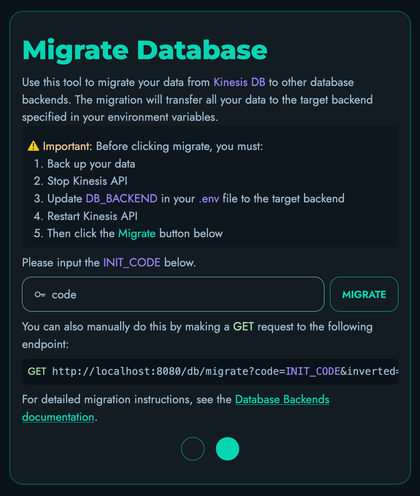
-
Enter your initialization code (default is
code) -
Click the “Migrate” button
-
Wait for the success confirmation message
-
Verify that your data is accessible in the web interface
Method 2: Using the API Endpoint
The general process for migrating via API is:
- Ensure you know what database backend you’re currently using
- Back up your current data (see the Backups guide)
- Stop Kinesis API
- Update your
.envfile to configure the target database backend - Restart Kinesis API
- Call the migration endpoint
- Verify that your data is accessible
Example: Migrating to SQLite
# 1. Stop Kinesis API
# 2. Update .env file:
DB_BACKEND=sqlite
DATABASE_URL=/app/data/db.sqlite  # Optional: specify custom path

# 3. Restart Kinesis API
# 4. Call migration endpoint:
curl "http://your-domain-or-ip:8080/db/migrate?code=your_init_code"
Example: Migrating to MySQL
# 1. Stop Kinesis API
# 2. Update .env file:
DB_BACKEND=mysql
DATABASE_URL=mysql://kinesis_user:password@localhost:3306/kinesis_db

# 3. Restart Kinesis API
# 4. Call migration endpoint:
curl "http://your-domain-or-ip:8080/db/migrate?code=your_init_code"
Example: Migrating to PostgreSQL
# 1. Stop Kinesis API
# 2. Update .env file:
DB_BACKEND=postgresql
DATABASE_URL=postgresql://kinesis_user:password@localhost:5432/kinesis_db

# 3. Restart Kinesis API
# 4. Call migration endpoint:
curl "http://your-domain-or-ip:8080/db/migrate?code=your_init_code"
Example: Migrating to Kinesis DB
# 1. Back up your current data
# 2. Stop Kinesis API
# 3. Restart Kinesis API (keep DB_BACKEND set to your current external database)
# 4. Call migration endpoint with inverted flag:
curl "http://your-domain-or-ip:8080/db/migrate?code=your_init_code&inverted=true"

# 5. After successful migration, you can optionally update .env to use Kinesis DB:
# DB_BACKEND=kinesis_db
# (or remove DB_BACKEND entirely)
# 6. Restart Kinesis API to use Kinesis DB as the active backend
Important Notes:
- Keep
DB_BACKENDset to your current external database (sqlite/mysql/postgresql) when calling the migration endpoint - The
inverted=trueparameter tells the system to read from the external database and write to Kinesis DB - Only change
DB_BACKENDtokinesis_dbAFTER the migration completes successfully - To migrate between external databases (e.g., SQLite to MySQL), you must first migrate to Kinesis DB, then migrate to the target database
Replace your_init_code with the init code configured in your setup (default is code).
Migration Endpoint Details
- Endpoint:
/db/migrate - Method: GET
- Query Parameters:
code(required) - Your initialization code (same as used for/init)inverted(optional) - Set totrueto migrate back to Kinesis DB (default:false)
- Behavior: Migrates all data between Kinesis DB and external database backends
- Normal migration (
inverted=falseor omitted): Migrates FROM Kinesis DB TO the external database specified byDB_BACKEND(SQLite, MySQL, or PostgreSQL) - Inverted migration (
inverted=true): Migrates FROM the external database specified byDB_BACKENDback TO Kinesis DB - Direct migration between external databases (e.g., SQLite to MySQL) is NOT supported - you must migrate to Kinesis DB first, then to the target external database
- Normal migration (
Important:
- The
DB_BACKENDenvironment variable should be set to the external database backend (SQLite, MySQL, or PostgreSQL) for both migration directions - For normal migration: Migrates from Kinesis DB to the external database specified in
DB_BACKEND - For inverted migration: Migrates from the external database specified in
DB_BACKENDback to Kinesis DB - The migration will delete all data from the target database
Migrating from Kinesis DB to External Database:
# Using curl
curl "http://localhost:8080/db/migrate?code=code"

# Using wget
wget -qO - "http://localhost:8080/db/migrate?code=code"
Migrating from External Database back to Kinesis DB:
# Using curl (note the inverted=true parameter)
curl "http://localhost:8080/db/migrate?code=code&inverted=true"

# Using wget
wget -qO - "http://localhost:8080/db/migrate?code=code&inverted=tru
Security Notes
The migration endpoint uses the same security code (init_code) as the initialization endpoint to prevent unauthorized access. Ensure your init_code is:
- Changed from the default value (
code) in production environments - Kept secure and not shared publicly
- Consistent with the value configured in your Configs settings
- Connection pooling is enabled for all external database backends (SQLite, MySQL, PostgreSQL) with a default pool size of 10 connections
- Network latency may affect MySQL/PostgreSQL performance compared to embedded databases (Kinesis DB, SQLite)
Best Practices
Before Switching
- Create a backup: Always back up your data before switching database backends. See the Backups guide for instructions.
- Test in a non-production environment: If possible, test the migration process in a development or staging environment first.
- Verify your init code: Ensure you know your initialization code before starting the migration.
- Stop write operations: Ensure no data is being written during the migration process to prevent data loss.
- Prepare target database: For MySQL/PostgreSQL, ensure the database exists and the connection URL is correct.
- Check permissions: Verify that Kinesis API has read/write access to the target database location or server.
- Understand migration paths: Remember that you can only migrate FROM Kinesis DB TO external databases, or FROM external databases TO Kinesis DB. Direct migration between external databases requires a two-step process through Kinesis DB.
After Switching
- Verify data integrity: Check that all your projects, collections, and data are accessible.
- Test functionality: Perform basic CRUD operations to ensure the new backend is working correctly.
- Monitor performance: Different backends may have different performance characteristics for your specific workload.
- Update backups: Ensure your backup procedures account for the new database backend.
Performance Considerations
-
Kinesis DB may offer better performance for specific Kinesis API operations due to custom optimizations
-
SQLite is well-optimized for general-purpose workloads and benefits from decades of development
-
MySQL provides good performance for multi-user environments and can scale horizontally with replication
-
PostgreSQL offers excellent performance for complex queries and large datasets with advanced indexing
-
The actual performance difference will depend on your specific use case and workload patterns
-
Consider benchmarking different options with your typical workload to make an informed decision
Troubleshooting
Migration Fails
If the migration endpoint returns an error:
- Check the Kinesis API logs for detailed error messages
- Verify that you’re using the correct initialization code
- Ensure you have sufficient disk space for the new database
- Verify the connection URI is correct and the server is running
- Ensure the database exists and the user has proper permissions (CREATE, INSERT, UPDATE, DELETE)
- Check that the MySQL/PostgreSQL server is reachable from the Kinesis API host
- Verify firewall rules allow connections on the database port
- Make sure Kinesis API has been restarted after changing environment variables
- For inverted migrations (back to Kinesis DB), verify you’re using
inverted=truein the request
Data Missing After Switch
If data appears to be missing after switching backends:
- Verify that you called the migration endpoint with the correct parameters:
- Normal migration:
inverted=false(or omitted) withDB_BACKENDset to the target external database - Inverted migration:
inverted=truewithDB_BACKENDset to the source external database
- Normal migration:
- Check that you’re looking at the correct database (file path for SQLite, database name for MySQL/PostgreSQL)
- For inverted migrations, ensure you did NOT change
DB_BACKENDtokinesis_dbbefore calling the migration endpoint - Review the migration endpoint response for any error messages
- Restore from your backup and retry the migration process with the correct parameters
- Remember: Direct migration between external databases is not supported - use Kinesis DB as an intermediary
Cannot Access Migration Endpoint
If you receive a 401 or 403 error when calling the migration endpoint:
- Double-check that your
init_codematches the value configured in Configs - Ensure you’re using the correct URL format with the
codequery parameter - Verify that the Kinesis API service is running and accessible
Getting Help
If you encounter issues during the database backend switch:
- Check the official documentation
- Create a new ticket in the issue tracker
- Contact support at [email protected]